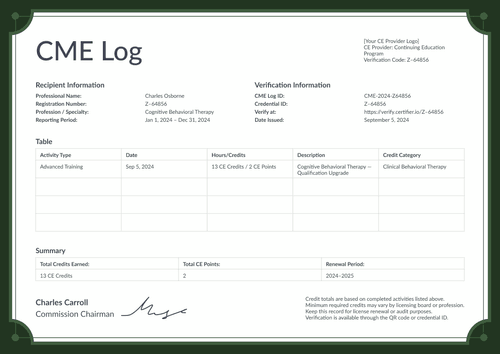
Modern blue CME tracker template
Personalize this modern blue CME tracker online or receive the editable Word package. Record approved CME activities and pair the log with its corresponding training certificate in Certifier.
Customize this template for free
Email and export in bulk
Track recipient engagement
Download in
Don't have Certifier account? Sign up
Free modern blue CME tracker template
This modern blue CME tracker template gives accredited providers a structured record of continuing medical education activity. It shows completed learning and the CME credits reported for a renewal period.
Portrait and landscape layouts use the same activity table and summary block. Blue patterned bands frame the record without distracting from its credit data.
Open the tracker in Certifier to replace the sample provider details. Map the approved CME record fields, then attach the corresponding training certificate from the credential template gallery. Both documents may then be issued as one credential set.
For recurring training records, connect the approved activity source through the Google Sheets integration. A CME administrator should review every credit total before delivery.
What is a CME tracker?
A CME tracker is a record of the continuing education activities a learner has completed toward a renewal period. This modern blue design logs each activity's date, topic, credit type, and hours, then rolls them up into a total credit and compliance summary. All you need is a free Certifier account to customize, edit, and issue this design online.
This tracker pairs with a matching training certificate, so a learner gets one short certificate per activity and one running log covering the full period. The log may accompany a corresponding training certificate in a broader training credential workflow.
The layout is A4 and US Letter, available in portrait and landscape formats.
What does this modern blue CME tracker include?
A CME record should follow the provider's approved reporting rules. The following elements are visible in the supplied tracker design:
Static layout elements
- Provider and reporting header: Fixed positions hold the CME Tracker title and provider logo. Labeled areas organize registration details, professional specialty and the reporting period.
- CME activity table: Fixed columns organize the Date and CME Activity. Further columns record Credit Type and Credits Earned, while Certificate ID ties each row to its source evidence.
- Credit summary block: A separate row presents Total CME Credits and Total Contact Hours. Other labels cover Assessment Score, Compliance Status and Renewal Period.
- Authorization and verification area: Two signature positions appear beneath the summary. Reserved locations hold the CME Log ID, Credential ID and QR-code verification route.
- Modern blue styling: Blue patterned bands frame the page, while pale table rules separate the activity rows. A short footer note explains renewal and audit use.
Dynamic fields (automatically populated after mapping in Certifier)
- Recipient name & registration number: The learner's name and a unique registration or license identifier.
- Profession/specialty & reporting period: The learner's field of practice and the dates the tracker covers –the first thing a reviewer checks for relevance.
- Activity log rows: Each logged activity's date, title, provider, topic, credit type, hours, and its own certificate ID, the evidence behind the totals.
- Total credits, hours & compliance status: The rolled-up credit and hour totals, an assessment score where one applies, and a compliance status label (e.g., Requirements Met).
- CME log ID & verification: A unique log ID, credential ID, and a verification link and QR code tying the tracker back to Certifier's issued record.
These are the changing fields visible in the supplied CME tracker design. They are not guaranteed to be pre-mapped. Configure the required fields in Certifier and use only information approved by the CME provider.
How to issue the modern blue CME tracker
Use this four-step controlled workflow:
- Customize the design and your branding - Open the blue tracker design, add your organization's logo, and set up the activity table columns you actually track.
- Bundle it with a matching companion document - Attach a training certificate template so the tracker and the certificate for each activity issue together as one credential set.
- Connect your tools - Upload a spreadsheet of learners and activities with Google Sheets, or connect Certifier to your member system. See all integrations.
- Review, issue, and verify - Have your CME office confirm every logged activity and credit total, then approve and deliver the tracker by email. Learners can share it using their verifiable credential link or QR code.
Available CME tracker template formats
Edit and issue the modern blue CME tracker online
Use Certifier to update the fixed text and map professional-specific values. The online route keeps the tracker connected to its training certificate and live credential page.
Receive the modern blue CME tracker in Microsoft Word
Enter an email address in the catalog popup to receive the available Word package. The offline layouts are editable files and require provider approval before use.
Export an issued CME tracker as PDF
Recipients may export an issued tracker from their credential page. Issuers may export PDF records within their plan limits. Browse certificate templates if another companion training design is required.
Who issues CME trackers?
Accredited CME providers
Accredited providers issue trackers from their approved participation records. They confirm the credit type and the value assigned to each CME activity.
Hospital and health-system education teams
Authorized medical education teams may issue CME logs for internal learning programmes. Their records process should identify the responsible provider and approval authority.
Medical associations and credentialing administrators
Professional associations or designated administrators issue trackers where their policy grants that role. Physician learners may retain and share the record, but they should not issue it themselves.
Frequently asked questions
Certifier templates are provided for general informational and design purposes only. They do not constitute legal, regulatory, accreditation, or academic-recognition advice and are not guaranteed to satisfy the requirements of any institution, recognition body, regulator, or jurisdiction. Using this template does not by itself make a document an official diploma supplement or prove a qualification. The issuing organization is responsible for verifying the content, authority, approvals, and suitability of every document before use. This template is not an official Europass document and does not guarantee recognition of a qualification.