Modern blue gradient attendance confirmation letter template
Adapt this modern blue attendance confirmation letter online or receive the editable Word package. Record approved event details and pair the letter with its matching certificate in Certifier.
Customize this template for free
Email and export in bulk
Track recipient engagement
Download in
Don't have Certifier account? Sign up
Free modern blue gradient attendance confirmation letter template
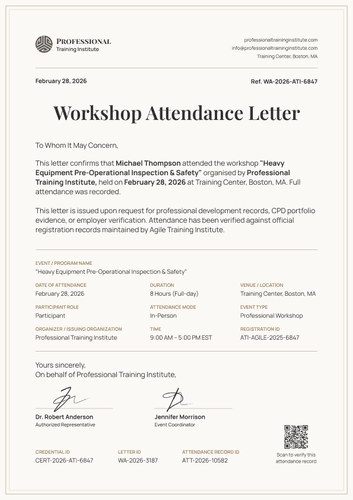
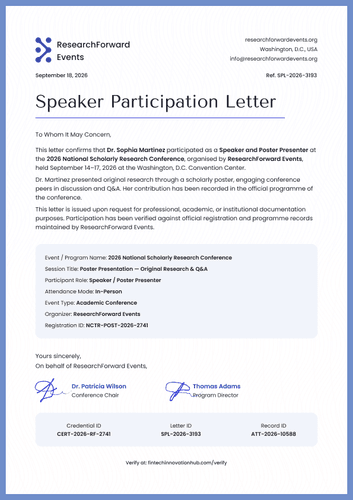
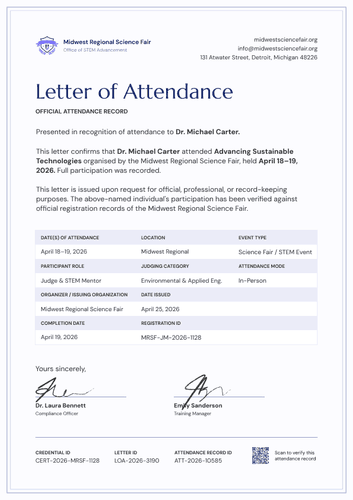
This modern blue gradient attendance confirmation letter template gives event teams a structured way to confirm that one participant attended a named program. The design records presence without making a claim about competence or course completion.
Alternating pale-blue rows keep the evidence easy to scan. A slim gradient frame creates a modern business-letter format.
Open the letter in Certifier to update the Management Innovation Hub sample branding and map the approved attendance values. Pair it with a corresponding certificate from the credential template gallery so both designs issue as one credential set.
For repeat events, transfer approved participant records through Google Sheets or connect Certifier with other tools like HubSpot or Salesforce. The event administrator should review the Full attendance statement before delivery.
What is an attendance confirmation letter?
An attendance confirmation letter is an issuer-approved document stating that a named person was present at a specific event. It gives employers or records teams more context than a short visual certificate.
The supplied letter identifies the Event/program name and Date of attendance. It also records Duration, Event type and Location. Participant role and Attendance mode clarify how the person took part. The letter proves only the attendance stated by the issuer.
This document is designed on standard A4 dimensions (21 x 29.7 cm), but also works in US Letter format (8.5 x 11 in).
What does this modern blue attendance confirmation letter include?
An attendance letter should reflect the organizer's approved register and authorization process. The following elements are visible in the supplied blue-gradient design:
Static layout elements
- Issuer header and issue date: Fixed positions hold the Management Innovation Hub-style logo and organization name. Issue Date appears at the top right, above the Attendance Confirmation Letter heading.
- Attendance letter body: Two fixed paragraphs explain that the document serves as proof of attendance and that Full attendance was recorded. A separate purpose sentence covers professional, HR or compliance documentation.
- Alternating event evidence rows: Pale-blue bands organize Event / program name and Date of attendance. Additional rows label Duration, Event type, Location, Participant role, Attendance mode, Organizer / issuing organization and Registration ID.
- Closing and dual authorization area: A Yours sincerely closing leads into two signature positions. The design labels an HR Manager and an HR Authorized Representative, with a separate issuer contact block at the right.
- Verification footer and blue frame: A ruled footer groups Credential ID, Letter ID, Attendance record ID and Verify at. Narrow navy-to-cyan side bars connect the supporting letter to its matching attendance certificate.
Dynamic fields (automatically populated after mapping in Certifier)
- Participant and event confirmation: Participant name identifies the person covered by the statement. Event/program name and Organizer / issuing organization connect the letter to one approved event register.
- Attendance details: Date of attendance, Duration and time show when the event occurred. Event type and Location describe the session, while Participant role and Attendance mode explain how the person joined.
- Letter control and verification data: Issue Date and Registration ID support retrieval from the organizer's records. Credential ID, Letter ID and Attendance record ID trace the issued document. Verify at provides the live verification address.
- Issuer contacts and authorization: Organization address, website and email identify the record owner. Signatory names, job titles and signatures show who approved the letter on the issuer's behalf.
These are the changing fields visible in the supplied attendance letter. They are not guaranteed to be pre-mapped. Configure the required attributes in Certifier’s design builder and use only data verified against the organizer's register.
The Credential ID and Verify at address should lead to the same issued record. Review Certifier's verifiable credentials features before publishing the final verification route.
How to issue the modern blue attendance confirmation letter
Use this four-step controlled workflow:
- Customize the design and your branding — Open the blue-gradient letter and choose A4 or US Letter. Select the required orientation, then replace the issuer logo and contact block. Map the participant, event rows and authorization details to approved data.
- Bundle it with a matching companion document — Attach a corresponding attendance certificate template. Check that the event name and attendance date agree across both designs. Review the Duration and Location before the letter and certificate are issued as one credential set.
- Connect your tools — Use Google Sheets for approved participant lists. Connect HubSpot or Salesforce when the event data starts in a CRM. Review other integrations for another supported source.
- Review, issue, and verify — Have the responsible administrator confirm that Full attendance was recorded. Review the signatories and IDs, then issue the letter with its certificate. Open the Verify at address before sending the credential set.
Available attendance confirmation letter formats
Edit and issue the blue-gradient attendance letter online
Use Certifier to update the organizer identity and map participant-specific attendance details. The online route keeps the letter connected to its live credential page and matching certificate. Reviewers can use the verification address to check the issued attendance record.
Receive the attendance confirmation letter in Microsoft Word
Enter an email address in the catalog popup to receive the available Word package. The offline file supports local editing, but it does not create a verified credential on its own. The organizer must approve the completed letter before distributing it.
Export an issued attendance confirmation letter as PDF
Recipients may export an issued letter from their credential page. Issuers may export PDFs within their current plan limits. The exported letter should retain the Credential ID and Verify at address. Check both values against the live credential before sharing the file.
Who issues attendance confirmation letters?
Event and conference organizers
Authorized event teams issue letters from their registration and attendance records. They confirm whether the participant met the organizer's definition of Full attendance. The team should retain the underlying registration record for later review.
Workshop and training providers
Providers issue attendance confirmations for seminars or structured learning events. They should avoid presenting attendance as competence unless a separate assessment supports that claim. An authorized representative should approve the letter before issuance.
Corporate HR and L&D teams
Internal administrators may issue letters for approved roundtables or professional events. Their process should identify the responsible HR signatories and retain the source register. The issued letter may then support an employee's internal participation record.
Frequently asked questions
Certifier templates are provided for general informational and design purposes only. They do not constitute legal, regulatory, accreditation, or academic-recognition advice and are not guaranteed to satisfy the requirements of any institution, recognition body, regulator, or jurisdiction. Using this template does not by itself make a document an official diploma supplement or prove a qualification. The issuing organization is responsible for verifying the content, authority, approvals, and suitability of every document before use. This template is not an official Europass document and does not guarantee recognition of a qualification.