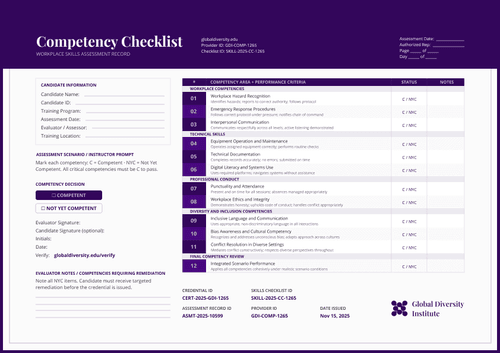
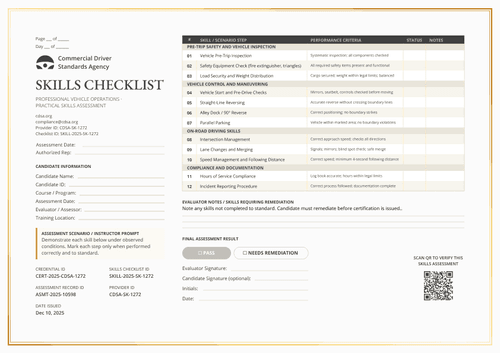
Navy blue practical assessment checklist template
Personalize this navy blue practical assessment checklist online or receive the editable Word package. Record proficiency levels and connect the approved checklist to its related credential.
Customize this template for free
Email and export in bulk
Track recipient engagement
Download in
Don't have Certifier account? Sign up
Free navy blue practical assessment checklist template
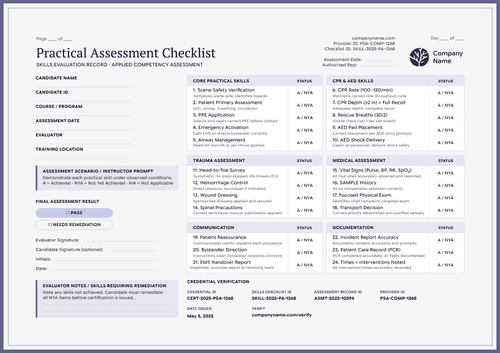
This navy blue practical assessment checklist template gives authorized instructors, training providers and assessors a compact proficiency matrix for one candidate. Twelve numbered skills are grouped into four competency areas.
Developing, Achieving and Competent columns show progress without reducing the review to a single score. The design states that every criterion must reach Competent before the candidate can pass.
Open the design in Certifier to replace the sample company identity and map candidate-specific results. Assessment teams can also import approved records through Google Sheets or another Certifier-supported integration.
What is a practical assessment checklist?
A practical assessment checklist records how a candidate performs defined skills under observation. A proficiency matrix can show the level reached for each criterion before the evaluator approves the final result.
The navy blue design uses three levels: Developing for a partial attempt, Achieving when most criteria are met and Competent when all criteria are met. Competent is the level required to pass in the supplied artwork.
The checklist can accompany a corresponding certificate as supporting evidence. The certificate presents the approved outcome, while the checklist explains how the evaluator reached it.
Keeping both documents in one issued record supports later review. Explore Certifier's verifiable credential features before choosing the verification and access settings.
What does this navy blue practical assessment checklist include?
A proficiency checklist should reflect the issuer's approved assessment process. The following elements are visible in the supplied navy blue design:
Static layout elements
- Provider and checklist header: Fixed positions hold the Company Name and Practical Assessment Checklist title. The Proficiency Matrix subtitle appears beside website, Provider ID, Checklist ID, Authorized Rep and Record Date.
- Candidate and assessment block: Labeled lines organize Candidate Name, Candidate ID and Course / Program. Evaluator, Training Location and Assessment Date keep the participant and session together.
- Three-level proficiency matrix: Fixed columns define Developing, Achieving and Competent. The legend explains D as a partial attempt, A as most criteria met and C as all criteria met. Competent is required to pass.
- Twelve applied skills: Four section bars organize Scene Safety & Primary Assessment, CPR and AED Skills, Trauma and Medical Assessment, plus Communication and Documentation. Criteria run from Scene Size-Up through EMS Handover Report.
- Remediation, approval and verification areas: Reserved positions hold evaluator notes, Pass or Needs Remediation, signatures, initials and date. The footer groups the credential, checklist, assessment and provider IDs with Issue Date and a QR code.
Dynamic fields (automatically populated after mapping in Certifier)
- Candidate and session identity: Candidate Name and Candidate ID connect the matrix to one participant. Course / Program, Evaluator, Training Location and Assessment Date define the evaluation.
- Scene safety, primary assessment and CPR levels: D, A or C selections record Scene Size-Up, BSI / PPE Precautions and Patient Assessment (LOC, ABC). The same matrix captures CPR technique, Rescue Breaths and AED Operation.
- Trauma, medical and communication levels: Changing marks cover Rapid Head-to-Toe Survey and Hemorrhage Control. Vital Signs, SAMPLE History, Patient Communication and EMS Handover Report complete the assessment.
- Remediation and final result: Evaluator Notes / Skills Requiring Remediation explain any skill below Competent. Pass or Needs Remediation states the outcome. Evaluator and optional candidate signatures, initials and date document review.
- Provider and verification data: Provider ID, Checklist ID, Authorized Rep and Record Date identify record control. Credential ID, Skills Checklist ID, Assessment Record ID and Issue Date support retrieval. The QR code opens verification.
These changing fields are visible in the supplied navy blue checklist. They are not guaranteed to be pre-mapped. Configure each required value in Certifier and use only proficiency results approved by the authorized evaluator.
The QR destination should match the displayed Credential ID, Skills Checklist ID and Assessment Record ID.
How to issue the navy blue practical assessment checklist
Use this four-step controlled workflow:
- Customize the design and your branding - Open the template in the online editor. Choose your size (A4 or US Letter) and orientation. Add your organization's name, logo, and colors, and adjust the text on the design.
- Bundle it with a matching companion document - Attach the corresponding design from the certificate template gallery, so both designs are issued together as one credential.
- Connect your tools - Sync course data from Google Sheets, HubSpot, or Salesforce rather than re-entering them for every cohort.
- Issue, deliver, and verify - Score each domain during the assessment, resolve anything marked not yet achieved, then issue with a verifiable credential link attached.
Available navy blue practical assessment checklist formats
Edit and issue the navy blue practical assessment checklist online
Use Certifier to update the provider identity and map candidate-specific proficiency levels. The online checklist can stay connected to its live credential record and related certificate. Reviewers can inspect the current issued evidence before relying on an exported copy.
Receive the navy blue practical assessment checklist in Microsoft Word
Enter an email address in the catalog popup to receive the available Word package. The offline file supports local editing, but it does not create a verified record. An authorized evaluator must still review and approve every proficiency selection.
Export an issued practical assessment checklist as PDF
Recipients may export an issued checklist from their credential page. Issuers may export PDFs within their current plan limits. The PDF should preserve the D, A or C selections and remediation notes. Scan its QR code before distribution.
Who issues practical assessment checklists?
Authorized instructors and practical assessors
Qualified evaluators may observe each task and select the demonstrated proficiency level. They should apply the provider's criteria consistently. Their identity and signature should appear on the approved checklist.
EMS education and competency programs
Authorized programs may use the matrix to document applied skills across a cohort. Administrators can prepare candidate data and coordinate issuance. The designated assessor should retain control of the final result.
Training centers and employer learning teams
Approved training providers or employers may issue the checklist within their own competency process. They should confirm the evaluator's authority and retain supporting evidence. The document must not be presented as a professional licence.
Frequently asked questions
Certifier templates are provided for general informational and design purposes only. They do not constitute legal, regulatory, accreditation, or academic-recognition advice and are not guaranteed to satisfy the requirements of any institution, recognition body, regulator, or jurisdiction. Using this template does not by itself make a document an official diploma supplement or prove a qualification. The issuing organization is responsible for verifying the content, authority, approvals, and suitability of every document before use. This template is not an official Europass document and does not guarantee recognition of a qualification.